The cashier layer for PaymentIQ, Praxis and your PSPs.

Fluid sits on top of PaymentIQ, Praxis or your own orchestration as the cashier your players actually see, and makes the deposit screen better.
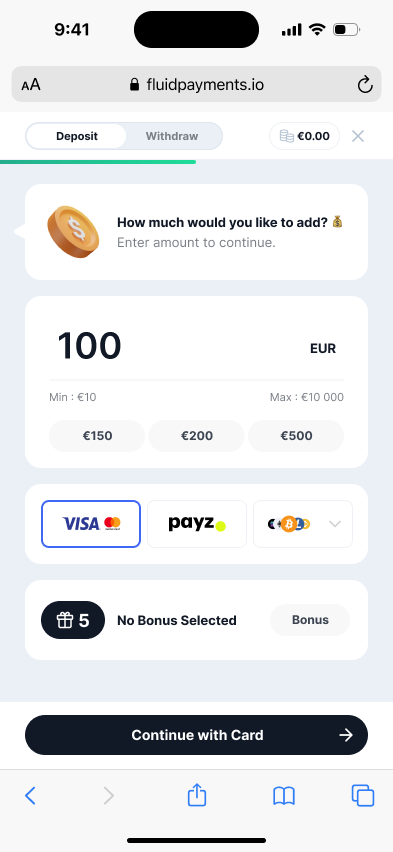
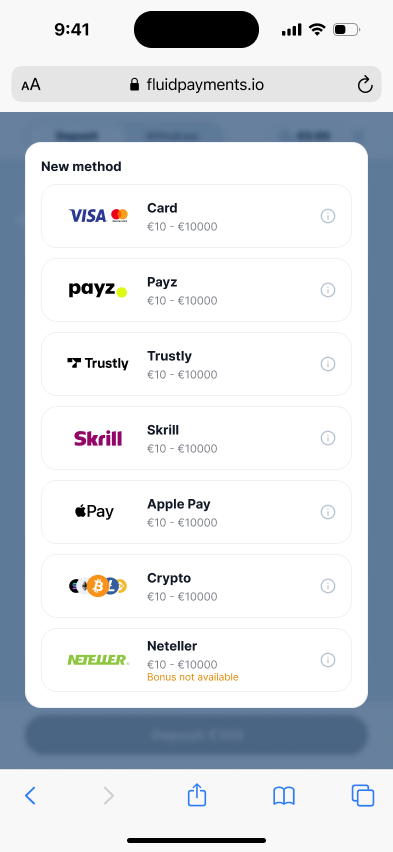
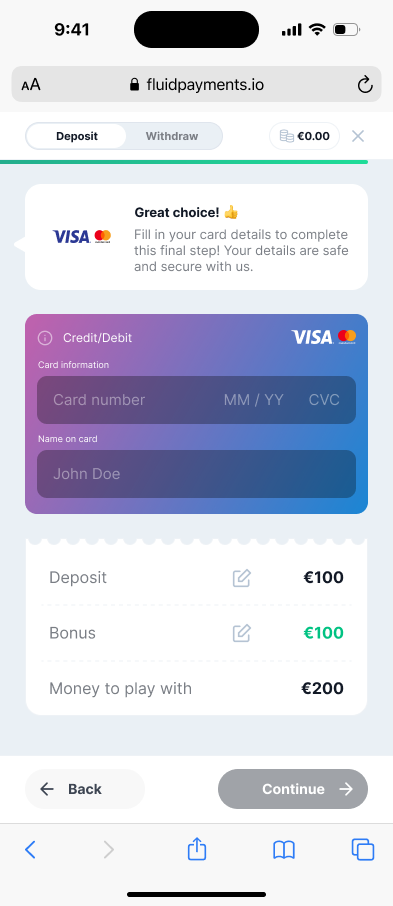
Real Fluid cashier screens in the operator’s own page: amount, methods, card form and confirmation.
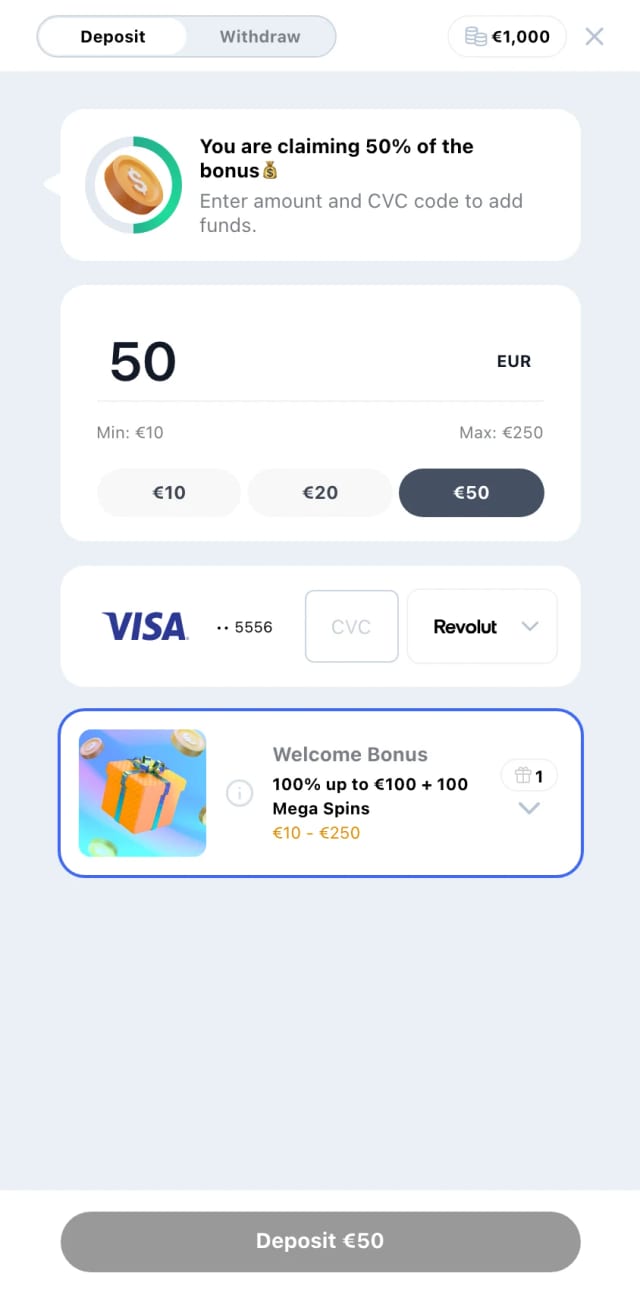
Fluid cashier running in the operator’s own page: amount step with the saved card first

Results that speak for themselves.

Fluid delivers measurable improvements across key metrics:

~60

Brands live on Fluid

+5%

Average deposit conversion

+19%

Repeat deposits

2 lines

Of JavaScript to install

In short: Fluid is a payment orchestration cashier: it sits on top of PaymentIQ, Praxis or an in-house orchestrator as the cashier players see, while routing, retries, failover and PSP contracts stay where they are. Most operators are live within a day.

How it fits

Fluid fits on top of your orchestration.

Keep PaymentIQ, Praxis or your own orchestration exactly as it is. Fluid replaces the layer your players see.

  1. Your site and appWhere players are

    Two lines of JavaScript open the cashier inside your own pages, in your design.

    WebMobile webApp
  2. Fluid CashierThe layer players see

    Methods ranked per player, saved details, clear errors and next-best methods, Quick Deposit.

    Fluid
  3. Your orchestrationStays as it is

    Routing, retries and failover keep running where they run today.

    PaymentIQPraxisIn-house
  4. Your PSPsContracts unchanged

    Acquirers, wallets, bank rails and crypto. Whatever your orchestrator routes to, Fluid can render.

    CardsWalletsOpen bankingCrypto

Before and after

From a hosted frame to a cashier in your page.

A hosted cashier

2domains in one deposit

  1. A frame loaded from another domain
  2. Its own look and its own load time
  3. The same layout for every player

Fluid

1domain: yours

  1. Web components in your own frontend
  2. Your brand and design system
  3. Methods ranked for each player

Illustrative flows. Typical cashiers vary by provider.

In your site

The same orchestration, a much better cashier.

Your orchestrator keeps routing every transaction. Players get a fast, branded cashier on desktop and mobile.

The Fluid cashier docked inside an operator site on a laptop, and the same cashier on a phone.

  1. 0 routing rules or PSP contracts to change
  2. 2 lines of JavaScript to install
  3. 1 day for most operators to go live

Who you’ll talk to

The people behind the cashier, on the call with you.

Jose Escobar

Jose Escobar

Chief Technology Officer

Over 15 years building software and engineering teams.

Maps Fluid onto your orchestration setup with your engineers.

Clinton Micallef

Clinton Micallef

Client Success Manager

Over 5 years in payments, focused on iGaming.

Runs the go-live and the switch-over with your team.

Roberto Rubio

Roberto Rubio

Founder & CEO

Over 20 years across tech, banking, fintech, startups and iGaming.

Talks commercial fit and terms once the numbers make sense.

Trusted by operators across Europe and North America

  • PowerPlay
  • VINN
  • Lucky Days
  • FoxyGold
  • Friday
  • SpinAway
  • The High Roller
  • Betiro
  • ShakeBet
  • LuckyPays
  • ChampWins
  • CatSpins
  • Shotz
  • BetMac

Works on top of the stack you already run

  • PaymentIQ
  • Praxis
  • Adyen
  • Trustly
  • Zimpler
  • Payage
  • Paymid
  • Payneteasy
  • Skrill
  • Neteller
  • Visa
  • Mastercard
  • Apple Pay
  • Google Pay
  • Swish
  • Vipps
  • MobilePay
  • Paysafecard
  • iDEAL
  • Bizum
  • + many more
PCI DSS CompliantGDPR.EU compliant

Why operators put Fluid on top of their orchestration

Orchestration is good at routing money. The cashier is where players decide. These six things are why the two work best as separate layers.

Layers

Routing below, cashier on top.

Fluid is orchestration-agnostic. Your orchestrator keeps routing, retries and failover. Fluid owns the screen the player sees.

  • Orchestration-agnostic
  • Routing stays put
  • Contracts untouched
How Fluid integrates with orchestration

In your site

Not a hosted iframe.

Orchestrator cashiers are typically hosted iframes. Fluid is component-based and renders in your own page, in your brand.

  • Web components
  • No iframe
  • Your design system
Why iframes hurt conversion

Per player

A cashier that adapts to the player.

Fluid orders methods per player, per region and per time of day, and surfaces saved methods first for returning players.

  • Per-player ordering
  • Saved methods first
  • Quick Deposit
Deposit conversion

Errors

Declines with a way forward.

Per-error messages and actions, set in the back office, and a next-best method after a failure, whatever the orchestrator returned.

  • Per-error rules
  • Next-best method
  • Plain language
Declined deposit recovery

Data

A dashboard about players, not just routes.

Orchestrator dashboards are good at routing data. Fluid Control adds real-time conversion, method performance and player behaviour.

  • Real-time conversion
  • Player behaviour
  • Per method and PSP
Fluid Control

Switch

Live in about a day.

Two lines of JavaScript, your existing orchestrator registered in Fluid Control, your theme applied. Most operators are live within a day.

  • 2 lines of JS
  • No re-papering PSPs
  • Dedicated success manager
Checklist: replacing the PaymentIQ cashier

Fluid Control

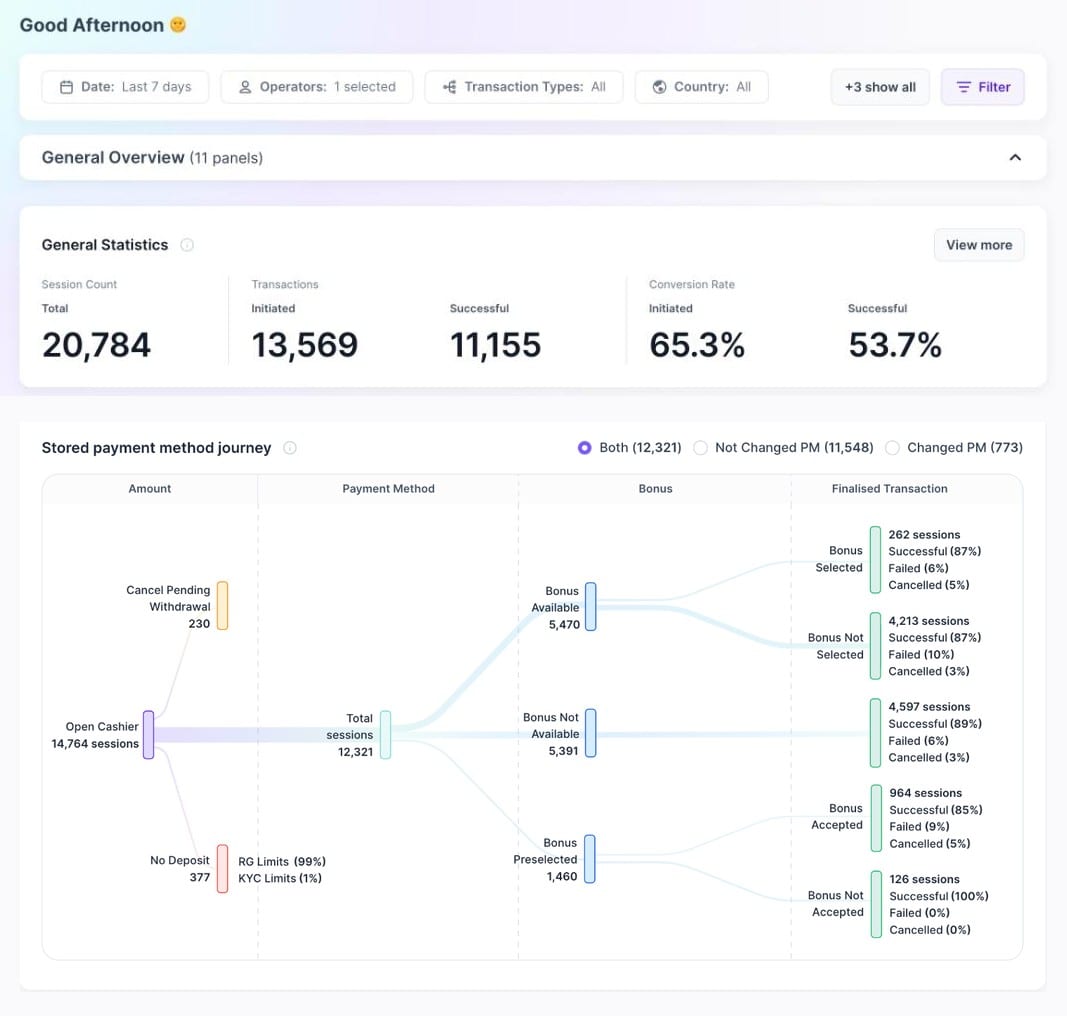
Your orchestrator shows routes. Fluid Control shows players.

Keep the orchestrator’s dashboard for routing data. Fluid Control adds the player side, in real time: conversion, method performance and how players move through the cashier.
Fluid Control
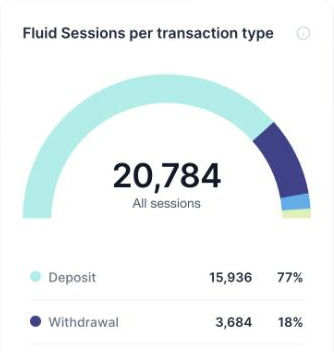
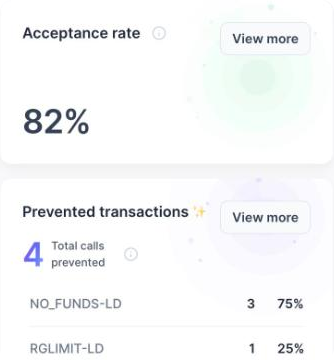
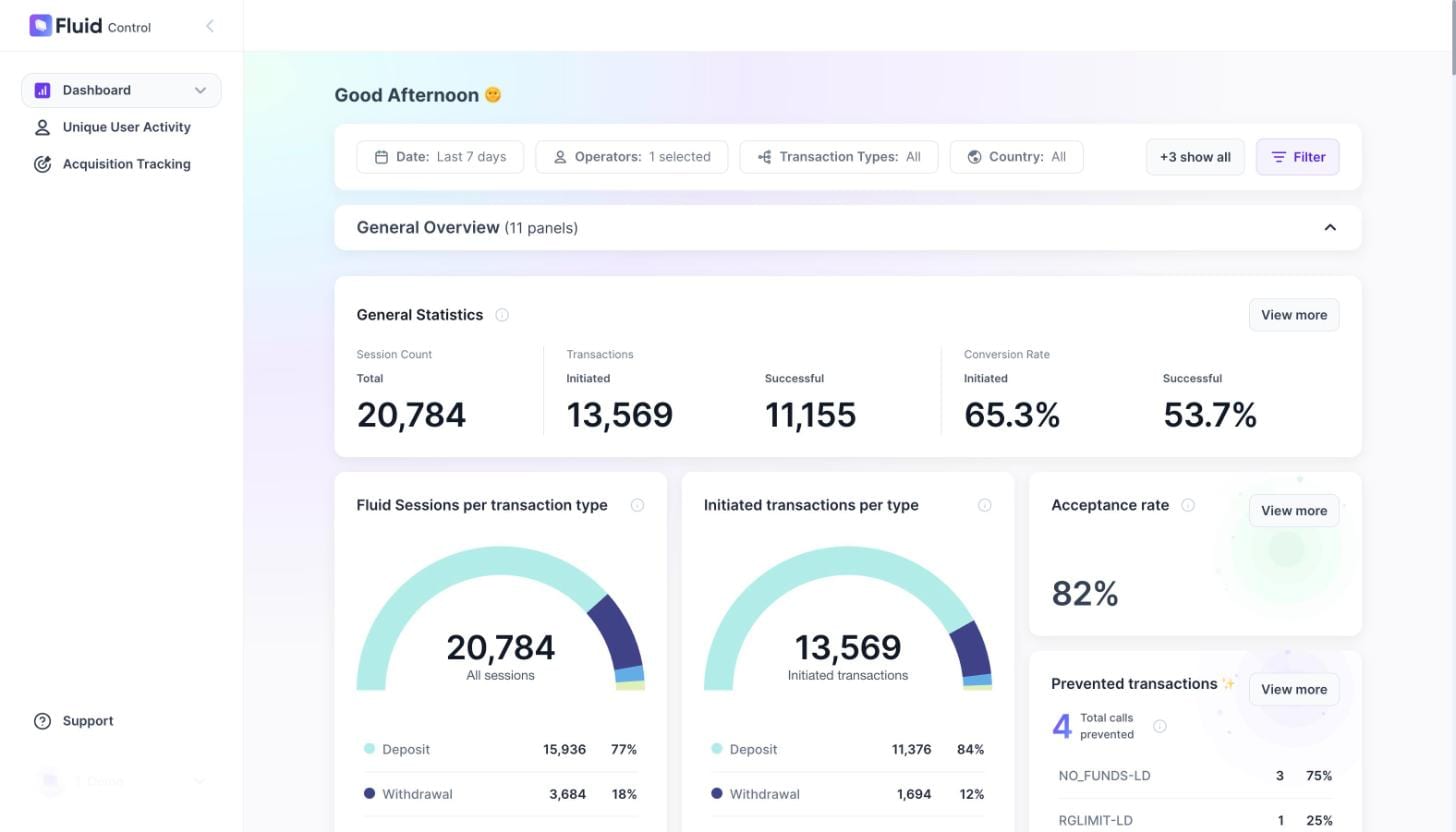
Fluid Control overview: sessions, transactions, conversion, acceptance rate and prevented transactions
Fluid Control payment-method journey: where players go between opening the cashier and the final transaction
Fluid Control tile: sessions per transaction type, deposits and withdrawals Fluid Control tiles: acceptance rate and prevented transactions
  • Real-time conversion Deposit conversion and success rate as they happen, not in tomorrow’s report.
  • Methods and PSPs Performance per method and per PSP, so a weak route shows up fast.
  • Player behaviour How players move through the cashier, step by step, and where they drop.

In your site

In your site, not in a hosted iframe.

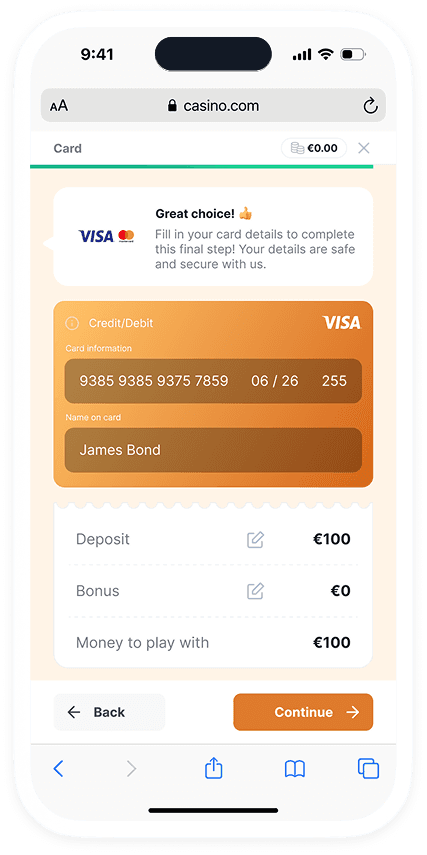
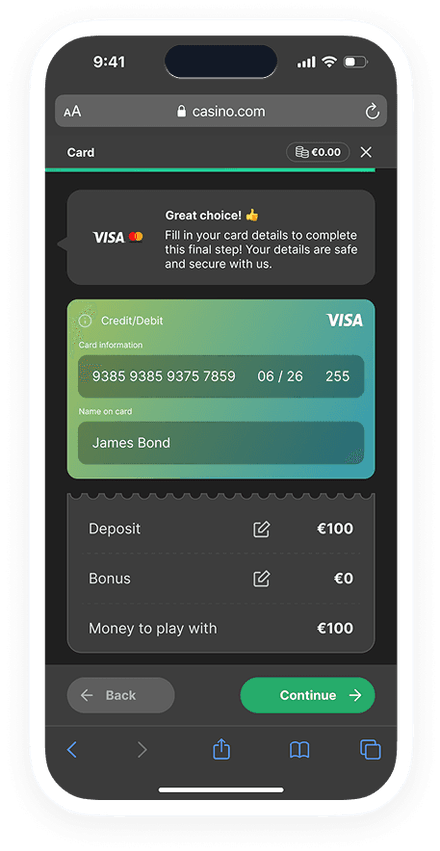
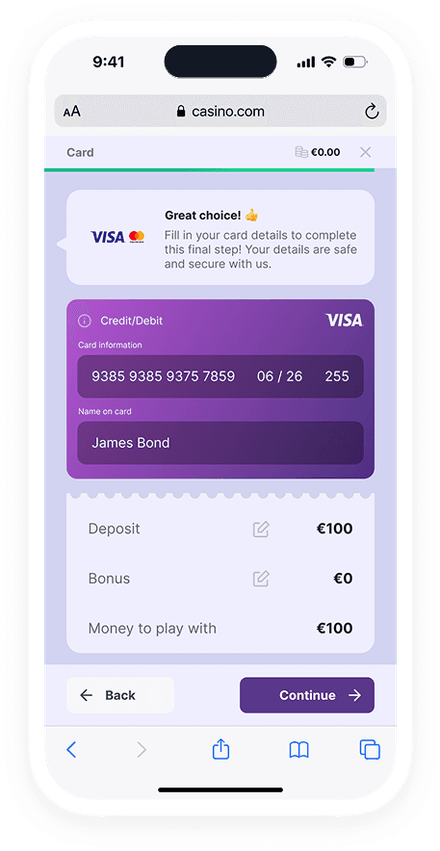
Fluid renders as web components inside your own site. Colours, type, copy and buttons follow your design system, so the cashier looks like the rest of your product. These are three real themes of the same cashier.
  • No iframe, no redirect
  • Themed from the dashboard
  • Up to 5x faster cashier loads
Fluid cashier in a dark operator theme Fluid cashier in a violet operator theme Fluid cashier in an orange operator theme

Why Fluid

The cashier is all we build.

  1. Built by payments people

    The team behind Fluid has run product, payments and engineering at iGaming operators and PSPs. We build for the operator side of the screen, and you talk to the people who build it.

  2. Proven in production

    Live since February 2024, with Lucky Days as the first operator. One million transactions by October 2024, five million by May 2025, and almost 60 brands live today.

  3. Measured on your numbers

    Operators on Fluid see +5% average deposit conversion and +19% repeat deposits. When Lucky Days and Bad Hombre moved to Fluid, deposits rose 12% and deposit conversion rose 5%.

What you get, and how it plugs in

Fluid replaces the cashier layer only. Everything underneath keeps working as it does today.
What’s included

  • Deposit and withdrawal flows as web components in your frontend
  • Works on top of PaymentIQ, Praxis or your own orchestration
  • Per-player method ordering and Quick Deposit
  • Per-error-code messages and next-best method
  • Fluid Control: real-time conversion, methods and player behaviour
  • Your routing, retries, failover and PSP contracts unchanged
  • A dedicated success manager from day one

How integration works

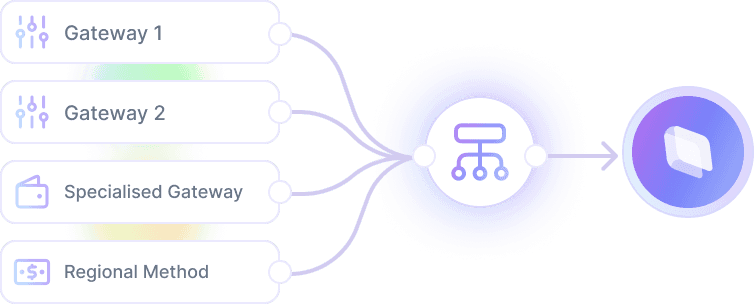
Several gateways, a specialised gateway and a regional method feeding into one Fluid cashier
  1. Add two lines of JavaScript

    The cashier loads as web components inside your own frontend. No iframe, no redirect to a third-party domain.

  2. Connect what you already run

    Register your PSPs or orchestrator in Fluid Control. Fluid works on top of any PSP or orchestration layer, so nothing underneath has to move.

  3. Theme it and go live

    Match your brand from the dashboard and switch traffic over. Most operators are live within a day.

Read the technical docs

FAQ

Orchestration and cashier questions

Short answers here. The long version, with the detail behind them:

Read: how Fluid integrates with orchestration

Do we have to leave PaymentIQ or Praxis?

No. Fluid is orchestration-agnostic and sits on top as the cashier. You keep your orchestrator, your PSPs and your contracts.

What stays in our orchestration layer?

Routing, retries and failover. Fluid owns the player-facing cashier: what the player sees, the order of methods, and what happens around a decline.

How is Fluid different from the orchestrator’s own cashier?

Orchestrator cashiers are typically hosted iframes. Fluid is component-based, renders in your page and adapts the flow per player. See Fluid vs PaymentIQ and Fluid vs Praxis.

Do we lose the orchestrator’s dashboard?

No. Keep it for routing data. Fluid Control adds the player side: real-time conversion, method performance and behaviour in the cashier.

Can Fluid work with direct PSPs too?

Yes. Fluid works on top of any PSP or orchestration layer, or a mix of both. See one cashier on top of every PSP.

How long does the switch take?

Installing the cashier is two lines of JavaScript, and most operators are live within a day.

Same orchestration. A much better cashier.

Tell us which orchestration you run. We’ll reply within 1 working day with a straight view on what Fluid would change.

  • Jose EscobarChief Technology Officer
  • Clinton MicallefClient Success Manager
  • Roberto RubioFounder & CEO

Book a call

Reply within 1 working day. No drip sequence, no resold details.